
Test Sets - Eval Suite
Overview
Test Sets allow you to create and execute bulk collections of prompts to validate the accuracy and reliability of the Jedify Semantic Fusion Model. By comparing current model outputs against a known "Golden Standard," you can ensure Jedify's responses remain trustworthy.
Purpose & Objectives
- Continuous Monitoring: Automatically monitor the accuracy of the Semantic Fusion™ Model over time to detect drift or anomalies.
- Regression Testing: Safely deploy updates or changes to the semantic model by validating that existing questions still produce the correct SQL and data outputs.
- Consistency Checks: Verify that the model produces deterministic results across multiple execution cycles.
Step 1: Creating a New Test Set
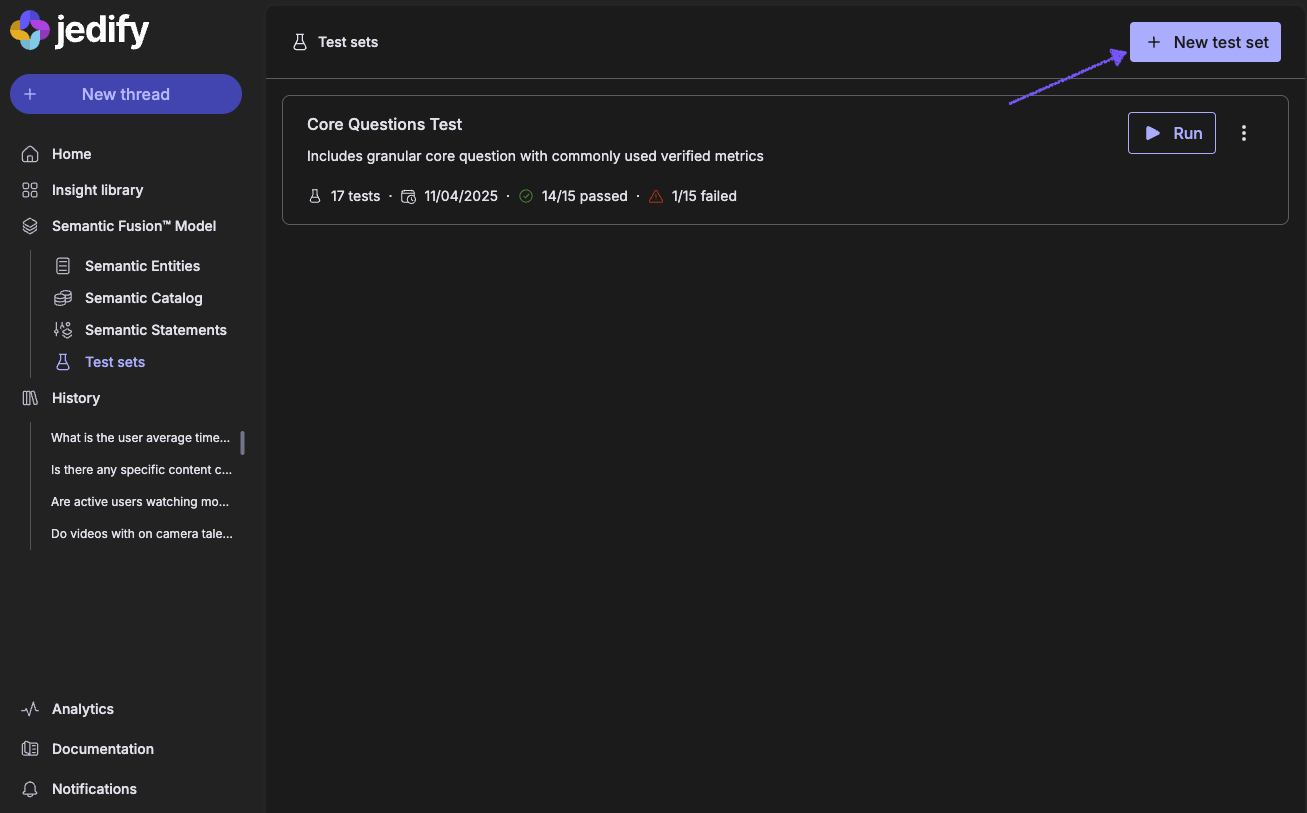
- To begin validating your data, navigate to the Test Sets page in the main menu under the Semantic Fusion™ Model.
- Click the + New Test Set button.
- Enter a descriptive Name and Description for the set.
- Click Create.

Step 2: Adding Questions to a Test Set
A Test Set is comprised of individual questions. Each question requires a "Golden Standard" - the confirmed correct response against which the model will be tested.
- To add a question to the test set, open a previously asked question through your History or ask a new one from the main homepage.
- Click on the (⋮) on the bottom left of the response, and select Add To Test Set
- Choose the test set you wish to add this question to and click Done
- Repeat for additional questions to capture a comprehensive test set
Step 3: Running a Test Set
Once your set is populated, you can execute it on demand or on a schedule (coming soon).
- Select the Test Set you wish to evaluate.
- Click the Run All Tests button on the top right corner.
- Configure Iterations: You will be prompted to select the number of execution cycles (1, 2, or 3).

- Confirm to begin execution.
Step 4: Interpreting Results
After execution, Jedify will mark each test as pass, fail or inconsistent by comparing the actual results of each question vs. the expected results of each question.
For each question, Jedify will compare the output data, the SQL generated and the entities selected.
For any inconsistencies detected, Jedify will highlight the possible reasons and recommended actions to resolve within the semantic model.
Tips on Defining a Comprehensive Test Set
To ensure your test sets effectively catch regressions and drift, aim for variety and depth rather than just volume. A well-constructed test set should cover the full spectrum of your data model's capabilities.
1. Vary Query Complexity
Don't rely solely on simple lookups. Your test set should include a mix of difficulty levels to test the model's logic:
- Simple: Single table selects (e.g., “List all active customers”).
- Intermediate: Aggregations and groupings (e.g., “Total revenue by region for 2024”).
- Complex: Multi-metrics, filtering, and advanced logic (e.g., “Show me the top 3 products by sales for each quarter compared to the previous year”).
2. Target "Golden" KPIs
Ensure that your organization's most critical metrics are heavily represented. If your team relies on "Gross Margin" or "Daily Active Users," create multiple test questions that derive these metrics in different ways to ensure the semantic definition remains stable.
3. Test for Edge Cases & Nulls
The model needs to handle data anomalies gracefully. Include questions such as:
- Zero Results: Queries that should correctly return no data (e.g., “Sales in Antarctica”).
- Ambiguity: Queries using synonyms or business slang to ensure the semantic layer maps them correctly (e.g., using "bookings" vs. "orders").
- Null Handling: Queries on columns that may contain partial data.
4. Test Fixed Time Dimensions
For regression testing and consistent validation, all time-based queries must use fixed, non-moving dates. This ensures the Expected Data Output is stable over time, allowing for a reliable comparison.
- Avoid: Dynamic phrases like "last month," "yesterday," or "Year to Date."
- Use Fixed Parameters: Specify exact date ranges in your prompts and reference SQL.
- Prompt Example: “Show total sales for the entire month of October 2024.”
- Granularity: Test aggregation by day, week, month, and year within these fixed periods to ensure the semantic model is generating the correct aggregation or grouping logic.
Pro Tip: Start small with a "Smoke Test" set containing your top 10 most used queries. Once that is stable, expand into a "Deep Regression" set covering the edge cases above.
Updated about 2 months ago